One sunny morning, Tom got a new tablet. He saw many colorful icons. He tapped one icon and opened a fun game app. Later, he typed a link in the browser to check a website about dinosaurs. He was curious. “Dad,” he asked, “what is the difference between app and website?” His dad smiled and said, “Both are ways to use the internet, but they work a little differently.” Apps and websites are everywhere: games, learning, shopping, and chatting. By the end of this article, you will understand the difference between app and website in a very easy way.
Key Difference
An app is a program you install on a device. A website is a page you visit on the internet using a browser.
Why This Difference Matters
Understanding the difference between app and website is useful for everyone:
- Students: Apps help with games and learning. Websites give research information.
- Beginners: Knowing which one to use saves time.
- Everyday life: Apps are fast, websites are easy to visit.
Knowing the difference also helps people choose the right tool for work, play, or school.
Pronunciation
Now let’s look at the full difference between app and website in simple, clear points.
Difference Between App and Website
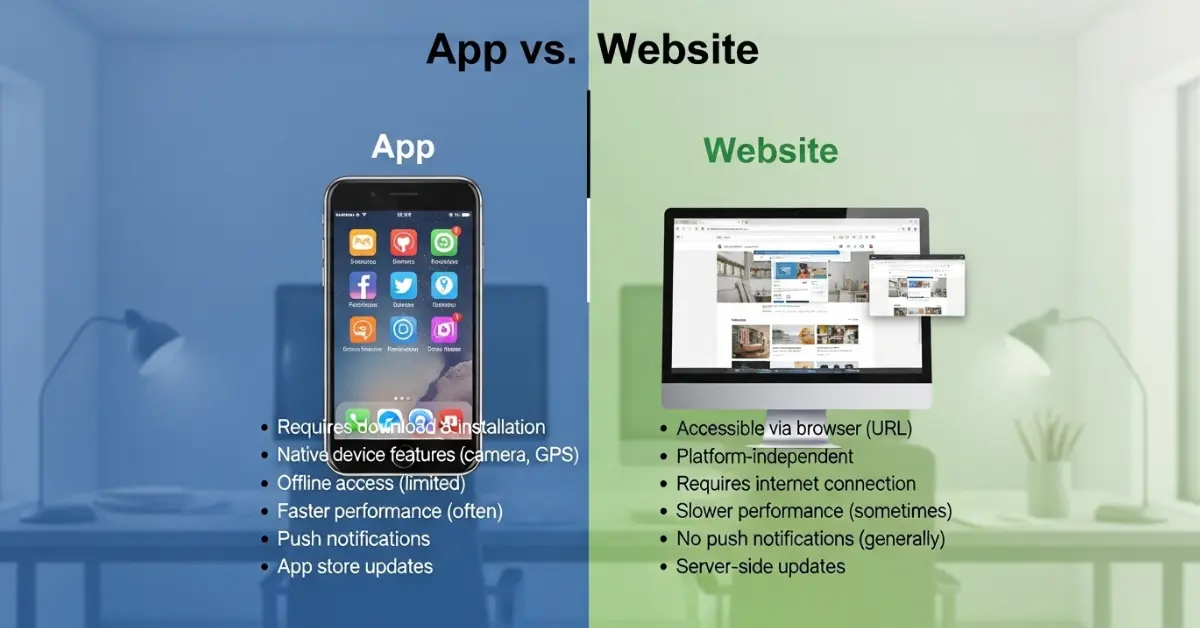
Here are 10 points to understand the difference. Each point is explained simply with examples.
1. Definition
- App: A small program you put on your phone or tablet.
- Website: A page or group of pages you open in a browser.
Examples:
- App: WhatsApp, YouTube app
- Website: google.com, wikipedia.org
2. How You Use It
- App: Tap the icon on your device.
- Website: Type a link in the browser and press enter.
Examples:
- App: Open Instagram by tapping the app icon.
- Website: Open Instagram website on Chrome.
3. Internet Requirement
- App: Some apps work offline.
- Website: Always needs the internet to work.
Examples:
- App: Spotify app can play downloaded music offline.
- Website: Spotify website needs internet to play songs.
4. Speed
- App: Usually faster because it is on the device.
- Website: May take time to load because of the internet.
Examples:
- App: Gmail app opens emails quickly.
- Website: Gmail website takes a few seconds to load emails.
5. Storage
- App: Uses space on your device.
- Website: Does not take space.
Examples:
- App: Candy Crush uses phone memory.
- Website: Wikipedia pages do not use storage.
6. Updates
- App: Needs updates from app stores.
- Website: Updates automatically.
Examples:
- App: TikTok app needs updates for new features.
- Website: News website changes automatically every day.
7. Access
- App: Often works only on certain devices.
- Website: Works on any device with a browser.
Examples:
- App: iPhone apps work only on iPhones.
- Website: Google website works on any phone, tablet, or computer.
8. Features
- App: Can use camera, GPS, and sensors.
- Website: Can do only some things.
Examples:
- App: Google Maps app gives real-time directions using GPS.
- Website: Google Maps website shows a map, but may not track your location.
9. Development Cost
- App: Usually costs more to build.
- Website: Costs less because one website works for all devices.
Examples:
- App: Banking apps need separate versions for Android and iOS.
- Website: Blog websites work on any device with the same code.
10. Security
- App: Often safer because it uses device protections.
- Website: Can be risky if not protected.
Examples:
- App: Bank apps use passwords and two-factor login.
- Website: Fake shopping websites can steal information.
Nature and Behavior
- App: Fast, personal, and interactive. Apps feel like a tool made just for you.
- Example: The Duolingo app helps you learn languages daily.
- Website: Open, public, and flexible. Websites are like libraries anyone can visit.
- Example: Wikipedia website gives information on almost everything.
Why People Get Confused
People mix up apps and websites because:
- Both give information online.
- Some apps are actually websites inside an app (called web apps).
- Some websites act like apps with buttons and interactive designs.
Examples:
- Gmail web and Gmail app
- Facebook website and Facebook app
Sometimes, websites are a bigger category, and apps are a smaller part inside it.
App vs Website Table
FeatureAppWebsiteInstallYesNoInternetSometimes offlineAlways neededSpeedFastMediumStorageUses device memoryNo storageAccessDevice-specificBrowser-basedUpdatesManual via storeAutomaticSecurityHigh (usually)Medium/variableFeaturesFull device accessLimited device accessCostHigherLowerExamplesWhatsApp, TikTokGoogle, WikipediaSimilarityBoth give informationBoth work online
Which Is Better?
Apps are better when you need speed, offline access, or device features like GPS or camera. For example, games, navigation apps, and banking apps are faster and easier as apps. Apps are like a pocket toolbox you carry with you, ready to use anytime.
A website is better when you want easy access without installing anything. News, blogs, and information searches are simpler on websites. Websites are like a town library open for anyone, anywhere, anytime.
Metaphors and Similes
- App: Like a pocket knife small, handy, and ready to use.
- Website: Like a library open, big, and full of knowledge.
Connotative Meaning
- App: Positive, modern, helpful
- Example: “This learning app is fun and easy.”
- Website: Neutral, informative
- Example: “Visit the website for homework help.”
Idioms and Proverbs
- “There’s an app for that” – means a solution exists.
- Example: Need to track your steps? There’s an app for that!
- “Knowledge is power” – websites give knowledge to everyone.
- Example: Read a website to learn new facts every day.
Works in Media
- Movies:
- The Social Network (2010, USA) – Shows apps and websites in action.
- Jobs (2013, USA) – About building apps and devices.
- Books:
- App Empire by Chad Mureta (2013) – Talks about making apps.
- The Shallows by Nicholas Carr (2010) – Talks about web use and learning.
Frequently Asked Questions
1. What is the main difference between an app and a website? An app is installed on your device; a website opens in a browser.
2. Can a website act like an app? Yes, web apps can work like apps inside a browser.
3. Do apps always need the internet? No, some apps like games or notes work offline.
4. Which is faster, an app or a website? Apps are usually faster because they are on your device.
5. Which is cheaper to make? Websites are cheaper; apps cost more because they need separate versions for devices.
Real-Life Use
- Education: Duolingo app or Wikipedia website help students learn.
- Shopping: Amazon app or Amazon website helps buy things.
- Communication: WhatsApp app or Gmail website helps chat.
- Banking: Bank apps are fast; websites give full info.
- Entertainment: YouTube app is quick; website gives search options.
Apps and websites make daily life easier and faster.
Final Words
Apps and websites are both important. Apps are fast, personal, and interactive. Websites are open, flexible, and easy to visit. Knowing the difference helps everyone use the internet in smart ways.
Conclusion
Understanding the difference between app and website is simple but powerful. Apps are installed programs that are fast and can work offline. Websites are pages you visit in a browser, easy to open, and always up-to-date. In this app vs website comparison, we learned how both are used in education. Apps and websites together make the digital world simple, fast, and enjoyable.

I am a professional English article writer with expertise in creating clear, well-researched, and engaging content. I specialize in writing informative articles that maintain accuracy, strong structure, and a polished tone. My work reflects a deep understanding of grammar, vocabulary, and audience needs. I am committed to delivering high-quality content that communicates ideas effectively and adds value to readers.